| 手動病毒碼更新-快速連結: |
| |
本文件在說明如何更新賽門鐵克的防護軟體產品。合約有效期限內的賽門鐵克防護軟體都能夠自動化更新,理解賽門鐵克整體的更新機制,以及無法連網或突發狀況時,本網頁的說明,應該會對您有幫助。
以下的連結為賽門鐵克的手動下載更新內容的原廠網址。相關說明請瀏覽以下說明內容: |
| |
手動下載-賽門鐵克病毒定義檔與安全更新(需自行選擇對應正確的產品及版本): |
| |
|
| |
手動下載-獨立的/個別的SEP的檔案式防護(傳統防毒),以SEP 14為例: |
| |
|
| |
手動下載-獨立的/個別的SEP的網路型防護(IPS),以SEP 14為例:: |
| |
|
| |
手動下載-獨立的/個別的-SEP的行為式防護),以SEP 14為例:: |
| |
|
 |
| |
賽門鐵克端點安全防護(SEP)的內容更新與版本更新機制說明: |
| |
SEP (Symantec Endpoint Protection)提供多種定義檔更新方式,讓電腦隨時隨地保持最新的安全狀態: |
| |
- 提供無法存取網路的電腦也能隨時保持最新更新的智慧型更新程式(Intelligent Updater)。
- 企業正統的集中控管型更新-SEPM Push mode(推送模式)。
- 無法集中控管的大量用戶端更新(如大學校園)-Internal liveupdate Pull Mode(拖拉模式)。
- 規模不大的外點(分公司/辦事處-無法架設SEPM的環境且需要更好的控管與安全)-群組更新提供者模式(GUP:Group Update Provider),能確保用戶端的即時更新並大大降低(網際)網路負載。
- 無法集中控管的可連網際網路的一般用戶端更新-Internet liveupdate ,Pull Mode(拖拉模式)。
|
| |
我們以五個部份來討論SEP 的更新 |
| |
壹、平日的常態性內容更新 |
| |
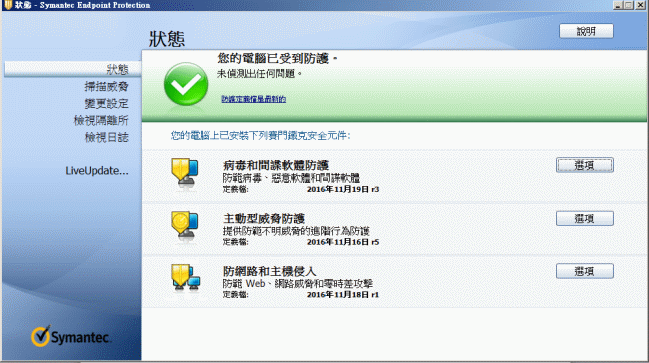
當您開啟SEP的用戶端操作介面,會發現有狀況底下有: 1.防毒和防間諜軟體防護,2.主動型威脅防護,3.防網路和主機侵入狀態指示與定義檔的日期。第1.個部份一日更新數次,而2.及3.則未必每天更新。 |
| |
- *如果您的SEP環境是管理型的(也就是有管理主控台-SEPM(Symantec Endpoint Protection Management)並且用戶端是接受控管的),那麼只要SEPM更新,則所有受控的用戶端馬上更新。SEPM除了主動更新用戶端的定義檔外,也能制定與修正安全政策並且強制用戶端點遵循。而SEPM主機本身的定義檔更新是透過自動連線到Symantec 原廠遍佈全球的數萬台主機,透過Liveupdate 的機制更新的。
- *在分公司(或是跨WAN)的受控管電腦,由於頻寬較小(相對於LAN),所以SEP 也提供一個稱為GUP(Group Update Provider-群組更新提供者)的架構,讓遠端的一部電腦能接受來自總公司SEPM 的更新內容,讓其它遠端的用戶端作為更新的來源,而不需要向SEPM來下載,可大大降低頻寬,另外,SEPM 也支援階層式的SEPM架構,而GUP 的系統需求不需像SEPM來得高,是節省成本的權宜作法。如果您的SEP環境是未受控管的(也就是不接受SEPM控管的),也有可能是原先是受控管的,但移出SEPM 的可控管範圍,則用戶端需自行透過Liveupdate機制自動連線到Symantec 原廠遍佈全球的數萬台主機去更新。在校園環境,許多學生電腦,無法接受控管,如果所有的人同時連線到網際網路去更新,則會消耗非常大的頻寬,則可在校園內自建與Symantec 原廠放在網路上供用戶連線下載更新的主機一模一樣的Liveupdate 主機,讓這些不受控管的用戶端連線到校園內的Liveupdate主機,可以大大減少更新時對網際網路頻寬的消耗。另外,即使接受控管的用戶端,也能開放在其使用者介面的Liveupdate的功能,連線至自建的或是Symantec 原廠的Liveupdate 主機,以規避SEPM失效的風險(SEPM 也提供HA的架構)。 企業內部如有建置微軟的WSUS 更新主機,則自建的Liveupdate 主機運作原理與WSUS 極為相似。
- *在不能連到網際網路也沒有SEPM 的環境如何更新:手動下載更新檔,雙擊滑鼠兩下,系統就會自動解壓縮該檔案,並自動將更新內容放置於對應的目錄,無需人為判斷該放置的目錄位置。不過利用這種方法只能更新 1.檔案式防護(傳統防毒) 2.網路型防護 (IPS) 3.行為式防護,但不能更新 4.信譽型防護 (Insight)。這樣非標準資安的環境,透過妥善的網路安全控管,應該可利用SEPM的架構來減少人力消耗,並且讓1,2,3同時更新,加強安全性。手下載病毒定義檔更新的網址,如下:https://www.broadcom.com/support/security-center/definitions
- *無法集中控管的可連網際網路的一般用戶端更新-Internet liveupdate,Pull Mode(拖拉模式),在開啟SEP 的使用者介面的首頁的左邊下方即有,即有「Liveupdate」 的按鈕,按一下即會自動更新。另外,在首頁的中間的「變更設定」的「用戶端管理」的「架構設定」的用戶端管理功能選項中,就有可設定Liveupdate 更新頻率及相關優化的調整選單可操作。
|
| |
貳、小版次的更新(升級) |
| |
小版次的更新,最主要是修正現有版本的Bug,效能及功能的提升(例如,Mr3就大大改善效能的問題),最新的作業系統的相容(例如,SEP14.3 的最主就是增加對Win 10及Server 2019的2004 正式支援)。
小版次的更新,原廠都有提供標準的最佳化建議,而保安資訊也都會提供可行並且驗證過的建議給用戶,以利快速安全地更新。
標準升級分成兩部份 Server 端(SEPM-Symantec Endpoint Protection Manager); Client端(Symantec Endpoint Protection agent) |
| |
- *Server端:可直接升級(upgrade) 不需重新安裝,原有的設定皆會保留。
- *Client端:若是有跟SEPM (Symantec Endpoint Protection Manager)保持正常連線的用戶 端,SEPM的管理界面可直接遠端幫用戶端無痛背景升級。如果是不接受控管的用戶端,則可由SEPM生成安裝檔,直接安裝即可升級。
|
| |
參、大版次的升級(移轉) |
| |
大版次的升級,往往將其視為全新的安裝。例如由賽門鐵克企業版防毒10.x 版升級為SEP 14版,由於整個架構幾乎完全不一樣,如果用戶端的數量不是很多,將其視為全新安裝會是一個快速明確的作法。
用戶端如果數量相當大,原廠都有提供標準的最佳化建議,而保安資訊也都會提供可行並且驗證過的建議給用戶,以利快速安全地更新。 |
| |
|
| |
肆、補助說明-賽門鐵克病毒定義檔更新頻率及相關問題 |
| |
不管單機版的Norton系列或企業版的Symantec防毒系列產品,都必需仰賴原廠病毒定義檔及掃描引擎的更新,才能發揮最大的安全性。
目前Symantec 的病毒定義更新大致分為 1.自動化更新的Liveupdate機制 2.手動下載的Intelligent updater 及專用提供給端點防護管理伺服主機(SEPM-Symantec endpoint protection Manager)的.JDB檔。 |
| |
- *Liveupdate 是內建於所有Norton/Symantec防毒軟體的自動(可設定排程)向Liveupdate主機要求更新的機制,只要一經要求就會自動取得更新。目前這個機制依產品不同,提供的更新頻率也不同。單機版的Norton系列在2009版次以後,企業版Symantec 系列在SEP 11.0之後(2016/11之後,最新版為:SEP 14),一天有好幾次的更新。甚至可每5分鐘就更新一次。而早先的版本是一天一次的自動更新。Liveupdate 這個機制的病毒定義檔是經過詳細確認的更新內容,可靠度與穩定度很高。
- *Intelligent updater-字義就是智慧型的更新提供者,沒錯,只要用戶取得這個檔案,點擊滑鼠兩下,就能自動解壓縮這個檔案,並自動將更新的檔案置放在對應的目錄,無需人工選擇該放置那些目錄。 用戶端用的Intelligent updater 大致分為:32位元/64位元版本。檔案名稱第一個欄位為-8碼的日期,第二個欄位為當天的版次(例如-032、-088),第三欄位為:V5i64(適用於64位元的作業系統)或V5i32(適用於32位元的作業系統),副檔名為*.exe。像是,20191120-032-v5i64.exe、20191120-088-v5i64.exe。
- *Symantec 也提供一種叫作Rapid Release (快速釋出的版本)的Intelligent updater-它與標準的Intelligent updater 的操作方式及命名方式一模一樣。只是Rapid Release 的更新頻率更高,幾乎可快到5~30分鐘就更新一次。Rapid release 顧名思義就是外速釋出的病毒定義檔,也就是當有人回傳病毒樣本給賽門鐵克的安全機制應變中心(Symantec Security Response-前身為病毒研究中心-SARC-Symantec Antivirus Research Center),後端的機制會產出新的解藥,放置於Rapid release 的下載區,經過確認沒有任何副作用的定義檔才會變成正式公開下載或自動更新的定義檔。rapid release 一般只建議於緊急狀態使用,由於不保證沒有任何誤判會相容性的風險,使用前請三思。
https://www.broadcom.com/support/security-center/definitions/rapidrelease
- *由於病毒定義檔的日期是以美國時間為基準,所以在台灣看到的病毒定義檔的日期會比台灣日期早一天(也就是台灣時間是2020/09/21,而您看到的最新病毒定義檔是2020/09/20),這是正常的。
|
| |
 |
| |
圖為:為SEP 的使用者介面(當您開啟右下方的SEP金黃色盾牌就能開啟) |
| |
|
| |
伍、如何手動更新 SEPM(Symantec Endpoint Protection Manager)專用的的 *.jdb 的病毒定義檔 |
| |
- *透過移至以下網址下載智慧型更新程式程式﹕
https://www.broadcom.com/support/security-center/definitions/download/detail?gid=sep
- *選取為 Symantec Endpoint Protection Manager Installations on Windows Platforms 指定的 *.jdb 檔案(比方說「vd4ae820.jdb 」)並將檔案儲存到 Symantec Endpoint Protection Manager 電腦的桌面。
- *將 *.jdb 檔案複寫到 \Program Files\Symantec\Symantec Endpoint Protection Manager\data\inbox\content\incoming 資料夾(預設的安裝位置)
- *在 30 秒至 1 分鐘內﹐*.jdb 檔案將進行處理(進行處理時﹐全部檔案和子資料夾都從 incoming 資料夾中刪除)。
- Symantec Endpoint Protection Manager 現在可以在 Symantec Endpoint Protection 用戶端登入時開始對其進行更新程式。
- *在SEP 12.1.6 之後的版本,(包含SEP 14),用戶端的病毒定義檔大小,已經分為兩種組態。就是完整的病毒定義檔(檔案命名為:比方說「vd4ae820.jdb 」),以及輕量型的病毒定義檔(檔案命名為:比方說「vd4ae820core3.jdb 」)。兩者之間差異明顯。下載時請特別留意。
|
| |
|
 |
| |
|